Showing posts with label computing curriculum. Show all posts

Sunday, January 31, 2016

Another EYFS /KS1 computing app

I have been playing with the Foos this morning and it's another nice free app for EYFS and KS1. 


It uses drag and drop blocks that scaffold learning. 


You can change the direction of your blocks by clicking on them, then select from arrows.


After you have mastered basic walking and jumping, it introduces the repeat command.


That's as far as I've got at the moment, but I can see that children will enjoy playing with it from what I have played. I will try it with my mini digital leaders next week. It requires some computational thinking, though doesn't challenge like other apps by asking children to think too much about direction. This is good for the children who find apps such as Beebot too challenging. 

 My only other criticism so far is that you don't have to be overly precise with the jumping/adding blocks. I was successful even when my code wasn't quite accurate. A nice start to early coding though.


Wednesday, September 16, 2015

How can digital leaders have an impact on the computing curriculum?


A post for #DLChat on 17th September at 9pm

I confess that my work with digital leaders has been sketchy over the past couple of years. I left the role of ICT coordinator two years ago, but that doesn't mean I have lost my passion for what I believe to be an asset to any school. We do have digital leaders at East Harling and I am fortunate to work with some of them in our code club, but I am not directly involved with what they do for the school. I have tried to get KS1 digital leaders going (mini DLs as I like to call them), but this has proved difficult despite their excitement about the role. Time is a problem. I aim to try again this year! The reason I am telling you this is that the following is based on experiences that are over two years old. They are still very valid and I actually feel very proud of what we achieved as a school before the computing curriculum became statutory. 

My digital leaders met at least once a week and had different areas of expertise, depending on their interests and what they wanted to learn. A couple were responsible for blogging and they updated their digital leader blog independently. They had lots of ideas, many of which came into fruition.


They hosted an open event where teachers and technicians (spot @kevin_sait!) came along to learn about the impact they have in school. I know that this had an impact as the ICT coordinator from my current school attended - and subsequently advertised for digital leaders. He has been supporting them in school for over two years now. 

So what about computing? Well I like to think that between the digital leaders and I we left a legacy of good practice. I was always quite hot on teaching the computing elements of the ICT curriculum as I knew that it was the part that teachers shied away from. Being an AST meant I had to know. I also wanted to find resources and ideas that would inspire children to engage and teachers to develop the passion to deliver confidently. So my digital leaders learned how to use - and become experts in - a range of resources such as:

  • Kodu
  • Mozilla thimble
  • Hackasaurus
  • Scratch
  • BYOB
  • Probots
  • Popcorn
  • Sherston resources
  • A range of ipad apps
I'm sure there were more, but these were the ones I remember most. I did not teach them, they learned by exploring, breaking things and through trial and error. Pretty much the same way that I have learned. It seems to stick better that way. 

They taught their peers during class ICT sessions, provided staff workshops and 1:1 support (depending on the teacher's year group), provided computing workshops for teachers in our cluster, presented e-safety sessions in assemblies, hosted kidsmeets, attended kidsmeets to learn new things and participated in cluster livewriting sessions to share expertise with other children. I have no doubt about the positive impact that they have had. I am very proud of one of my digital leaders who, after two years of campaigning to get her high school to employ digital leaders, has taken on the role herself. At the end of last year she had 20 year 7 digital leaders turn up! Wow! 


Of course the impact they have had is only measurable by the anecdotal evidence from other staff members, but I know that many felt more confident to try things out after they had received training from a digital leader - or they had them supporting in class. The laptops were being booked out more, staff were becoming more adventurous with what they were teaching and the children were leaving school with a greater level of skills.

I know that schools rely on passionate staff (or young people!) to keep any digital leader movement going. As a deputy, SENDco and year 2 teacher my time is very limited. My experience with year 6 digital leaders though was that they almost managed themselves. Some of them came more than twice a week and I was quite frank that they had to work things out themselves - and they did! At times all I provided was my room, meagre tips (and only when I could sense frustration) and the fact that I was available (often marking). So if you really want to get started but are concerned about protecting your time, promote an ethos of self-learned expertise. 

In #DLchat I would love you to share your successes and struggles. Maybe we can persuade others to employ them this year and find out for themselves what impact they can have.

Saturday, May 16, 2015

Learn to Code

I have long been a fan of the Rising Stars Switched on ICT units because of the way that they cover ICT in a creative way, supporting teachers who have low confidence in covering he curriculum. With the move to the computing curriculum, Rising Stars have responded quickly, with a set of Learn to Code books, written by Claire Lotriet @ohlottie. 


When I first saw them I was impressed with the way that the units are set out in easy to follow steps and that they can be used progressively through KS2. Our ICT coordinator felt the same and that they would be a useful addition to the resources that we have in school. 


Exploring Kodu

The fact that the activities are based on free resources means that it can be a cost effective way of covering the computing curriculum, especially for less confident teachers. There is a great variety too! The programs in the unit cover sequence, selection, and repetition in programs; working with variables and various forms of input and output. I was pleased to see Kodu and Thimble included and impressed that it moved on to things like Python and AppInventor. 


Ensuring the Scratch instructions work!

It was important to find out what our children thought though, as they often have different opinions from the teachers!  So my year 5 code club (which includes some digital leaders) have spent the last couple of weeks reviewing some of the activities (they selected the ones they wanted to try out). The thing that stood out was that my children were generally able to follow the instructions and investigate independently. There is a range of ability within this group and the normal range of personalities, from those who quietly persevere, to those who prefer to work in pairs and others who are motivated by other's successes. The children who have the least stamina were given the easier tasks from the first books.


Lightbot explorers

I did my usual observing and questioning and when they did get stuck I encouraged them to return to the last instruction and try again, which they did! They have learned essential computing skills, such as using logical reasoning and debugging as well as perseverance. They have thoroughly enjoyed using them – not just the more familiar resources like Scratch, Lightbot or Snap and the creative enticement of Kodu, but relishing the success they felt when they have managed to create a script and program a turtle using TouchDevelop. Drawing a square with a turtle using this unknown resource was a huge coding achievement for one child.

Amazing perseverance with TouchDevelop

I think this is a great scheme for helping primary aged children (and early secondary) develop their coding confidence. If you lack confidence as a teacher to deliver the computing curriculum, you won't go far wrong with these. 

NB Depending on the experience of your children, you may want to use books meant for lower year groups with your children.

Sunday, May 10, 2015

Successful resources for the computing curriculum

Last Thursday #DLChat focused on successful resources that have been used in the computing curriculum. I started a gdoc to crowd-source these successes and to show how digital leaders have supported delivery of the computing curriculum. Many of you will know how passionate I am about digital leaders, the benefits to them as students and the impact that they can have in school. It is great to see how schools have benefited from their skills. 

 This differs in the crowd-sourced computing document as it is not just ones that are known, but ones that have been used.  I have blogged about many computing resources and am proud to say that there are very few that I haven't tried in school - and this is mostly because they are new, not appropriate for KS1 and I only have an hour a week with my code club so haven't got round to them yet. Please add any that you know of that haven't been listed. There are lots of valuable ideas in the #DLChat story below too. 


Sunday, May 3, 2015

Another free computing app: Tickle

My good #DLchat friend @clcsimon recommended this app to me during #dlchat a couple of weeks ago. You can use it to program air drones, connected toys and smart home devices, such as Philips Hue lighting system. If you don't have any of these devices you can do like I do and use it to program Orca. There are some 'courses' on their website that you can use ( https://tickleapp.com/courses/) or you can create your own.


Other creatures are available within the app, which is free. It's another one that is as easy to use as Scratch and Hopscotch, but the different 'sprites' will appeal to different children. It also has some quite funky music. The fact that it's free means it is definitely worth getting your digital leaders or code club members to explore and review it. It's their opinions that really count isn't it? I shall add my code clubber's thoughts when they've had a play.


If you've already done that, please share blog posts or your thoughts in the comments. Thank you! 


Friday, April 24, 2015

Blox 3d world

This evening I've been having a quick play with Blox 3d world, which was free yesterday via apps gone free. I liked the look of it because it reminded me of kodu, but on the iPad. Granted it doesn't allow you to program elements like kodu, in fact it is very basic, but I've still had fun creating my very own Westeros. 


There are some tutorials that you can watch, which will show you how to create things based on the type of world you want to build.


I quickly created my land and Castle Black, then added some watchers on the wall and some (white) crows, before starting on Winterfell and the King's road. This took minutes, once I got the hang of adding blocks. The area reduces in size as you start to fill the screen, allowing your world to expand. I initially found it quite tricky to add the land and I think you do have to tap it in the right place (the brown  bit underneath the turf), but it is easy to delete blocks that you misplace - and build them up into hills, walls etc.


Some of the elements interact with each other and it was particularly humorous when I added a tiger (the nearest I could get to Ghost) to the wall as all the watchers ran around with their arms waving in the air. Well it tickled me anyway!


I think it has value in that children can use their imagination and create their own worlds, testing how things interact with each other. 


For more information, check out http://www.blox3d.com. 


Sunday, April 12, 2015

Digital Literacy


When I first created the Digital Literacy page for my iPad site I took the title literally and included all sorts of great apps to support children's developing literacy skills. Then I read other educators' work, such as Doug Belshaw's, which pointed me in the direction of things like Future Lab's ideas, from It's Not Chalk and Talk Any More


'Digital literacy is a complex and contested term. It is often understood as the ability to participate in a range of critical and creative practices that involve understanding, sharing and creating meaning with different kinds of technology and media ...'


This made me realise that I needed to change my thinking - and the website page! It's taken me a long while getting around to it - and now it is a relatively naked page waiting to be dressed. I need to do it properly, so need to read and reflect.


In their computing guide, CAS make it clear that there are three aspects to the new computing curriculum: computer science, information technology and digital literacy. Their aims for digital literacy are that 

'[All pupils] are responsible, competent, confident and creative users of information and communication technology.' 

though they also acknowledge that the distinction between information technology and digital literacy are open to interpretation. What these aspects do though, is remind us that the new curriculum is not solely about computer science and programming. A lot of people turned their noses up at the new curriculum and complained about the lack of creativity. I wasn't one of them as I think that we have been given carte blanch to interpret the curriculum, carry on doing what we know works well, whilst ensuring that we are teaching essential skills and the area of the old curriculum that most teachers were shying away from - control and modelling. That's not an assumption based on anecdotal evidence - it was the area I was most requested to support during the five years when I worked as an AST and ICT consultant.

So now I am trying to get my head around what digital literacy would look like for children in KS1 and KS2 at our school. I have found a digital literacy skills checklist - Being Digital - from the Open University, which has provided food for thought and is a useful model for my own document. 

My aim for the next half term is to create a meaningful digital literacy page on the ipad site, continue creating some self assessment documents for the computing curriculum, based on my ICT and iPad self assessment documents whilst simultaneously deciding what digital literacy means for our school. Needless to say they go hand in hand - curriculum and assessment.

If you are a regular reader to my posts, you will know that at East Harling we worked together to create a unique new curriculum with values that are meaningful to our school. Each term we share the ways in which we have covered our curriculum and I love hearing what other teachers have done, because there now seems to be very little time in the working week to catch up. We are desperate to hold on to these ideals, whilst working hard to get to grips with the new curriculum and demands of OfSTED and better than expected progress. It is unfortunate that many of the strengths of our children are not measured in their SATs tests, but that's a whole new blog post... 

Because of the aforementioned reasons I don't want to rush, in the same way that we have not rushed into a new assessment without levels system (plus I'm doing this under my assessment coordinator and 'can't let go of ICT'  hat and really must work alongside our computing coordinator on this). Our computing curriculum and assessment methods have to fit in with how we want to prepare our children for secondary school - and life!

If you know of any essential reading to add to my list, I would be very grateful, as I suspect would many other IT folk who read this post! 


Reading list 

Future lab - Digital Literacy Across the Curriculum

Miles Berry - The New Computing Curriculum -some thoughts in fact pretty much everything Miles writes on his site is useful!

Kevin McLaughlin - Digital Literacy in the Primary Classroom

Simon Haughton - Interpreting the New Curriculum Requirements

Somerset learning platform - Digital Literacy

Or if you need a break from reading, then sit back and watch Doug!

Tuesday, March 31, 2015

Creating iBooks in year 2

I have blogged about the Book Creator app before, but have learned how to print our iBooks this week, so thought I would dedicate a post to them. I know printing is not the point of them, but until we are at the point where our children have their own Dropbox or wiki spaces it's the only way they get to keep their work. 


They look great! Each book has between 5-9 pages and my year twos have been using all sorts of wordprocessing/publishing skills. They worked to success criteria that they generated and I typed for them. This helped them be independent and largely successful. 


If you do plan to create these yourself, make sure you allow enough time. Written pieces might be produced over a couple of lessons, with maybe a little extra time for additional research. These books were the culmination of almost 6 lessons!  We used guided reading sessions to research facts from a range of sources: information books, print outs and internet research. For the latter, essential digital literacy skills were reinforced, such as reliable sources and checking facts. 
We learned about the features of non-fiction books and also practised note-taking skills so that their writing would be in their own words. You also have to take into account that typing is slow due to lack of keyboard familiarity and editing can be disastrous. Children have accidentally deleted work, then forgotten about the back button. I truly believe they need to experience this (making mistakes and 'breaking' things) to learn effectively. The emotional disappointment of losing work, then remembering they can retrieve it is fab! 


As you'd expect, the stronger writers wrote more complex sentences, but they all experimented with layout and formatting. I'm dead chuffed! You can see their work on the class blog and check out the learning@home pages too - some children took their skills home with them (more pics will be added soon). Perfect! 

Monday, March 9, 2015

Quality free computing resources part 1: Code club and hour of code


This year I started running Code Club for year 5 children. We have access to PCs and ipads and will use both, as well as some hardware to use in the future.


My 'code clubbers' are also going to blog about their journey as a kind of online journal. That's what blogging is all about! They have been an enthusiastic bunch who have dived right in to what ever I have shown them. So here's how I've run it so far: I share a link, I give a clue (sometimes) and I leave them to it! It's all about their computational thinking and I'm not going to spoil that process by spoon feeding too much.

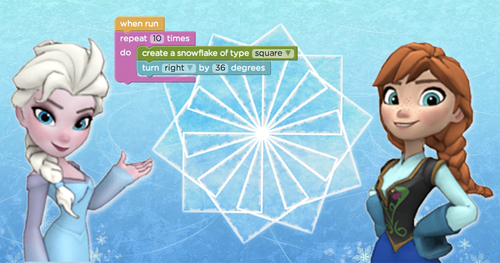
I had signed up to hour of code a while ago so that I was familiar with the resources and had used the Frozen hour of code with my year 2 class. It went down very well. I used the same with the year 5s, knowing that they would go beyond the highest level that my year 2s got to (12). The children are very motivated by the certificates at the end. We have since used Flappy Birds, Tynker and Scratch on both the iPad and PC. 


The thing about the Hour of Code is that it's all there ready for you to use. There are tutorials and each puzzle comes with hints and/or clues. It really has been well thought out as it scaffolds children's learning beautifully. My year 5 code clubbers will be able to help others in class when needed, though I think most will be able to manage without their support.

Tynker was very popular because you were able to build your own characters before starting each puzzle and Frozen, because who hasn't seen the film?! Within Tynker there are a range of different games to try and some are easy enough for my year 2 class. So, enough of reading my post - get onto code.org and get playing yourself!

Shropshire Computing Conference March 2014


Hello all! Please share your thoughts, ideas and questions on a sticky. 

Yellow notes are links to share. Write thoughts and ideas on green and questions on blue please.

Shropshire Computing Conference presentation

Here is my presentation. Hopefully you will be able to find everything that I have referred to here by clicking on the Shropshire Computing Conference tag at the bottom of the post.

Free literature / resources to help you deliver the computing curriculum

This post is another information post for the Shropshire Computing Conference, in case I don't have time to say everything I want to. I'm saying thanks to all the folk mentioned at the start of this post, in case they don't scroll down to the end! Your hard work saves us time and energy - and for that I would imagine there are many grateful people as grateful as I am. So, some freebies ...


Miles Berry is a king in the computing world. If you don't believe me, check out his blog where you will see that he helped write the curriculum for primary. He has also written the CAS Primary Computing in the National Curriculum: A guide for teachers

What Miles does well is remind us that the new computing curriculum is not so different from the old ICT curriculum. Don't forget all the lovely creative things you have been doing with open ended projects and collaborative work, using all sorts of resources.

********************

The BSC, a key partner to CAS (computing at School) has created a computational thinking framework and a computing progression pathways chart.


The former is structured in the following helpful areas:

Stage 1: Definition 
Stage 2: Concepts 
Stage 3: Classroom techniques 
Stage 4: Assessment

With the progression pathway featuring in the assessment stage.


********************


Barefoot computing is part of CAS, aimed at primary aged children. It has some brilliant free resources to help you plan, learn yourself and teach computer science. Take a look at this fossil animation algorithm that they have created.


********************


Rising stars have been good friends to me in my previous role as an AST and in producing my Getting Started with Digital Leader leaflets. They provide a huge amount of free resources to support teachers and are currently offering free computing webinars. Rising Stars have also published a free CPD toolkit - Quickstart Computing. Last year, every school received sample units for KS1 and KS2 Switched on Computing, written by the aforementioned Miles Berry. Finally, they also provided a free computing with Microsoft taster pack (see image) with 6 units that cover the new curriculum program of study.


********************


Last, but in no way least, Simon Haughton produces a huge amount of free resources for ICT and computing, for which we are very grateful. His booklet, Computing Theory for 7-11 year olds, will come in very handy for many educators. 


Sunday, February 8, 2015

What is an algorithm?


Trying to teach your children what an algorithm is, but not sure how? Well there's plenty of support out there that will help you become more confident when teaching your class to understand what it means - and how to write them.

The BBC describe algorithms as a list of rules to follow in order to solve a problem. They have kindly created a page called Code Needs Algorithms, which is part of their What is an Algorithm? Bitesize pages. You are reminded about the times that you have already used algorithms, such as map directions and instructions for how to make things. There is a handy video that you can play to your class before starting work. With the pages on digital literacy, it's a nice gentle way to get you started on the computing curriculum.


When the light bulb pings and you realise that you have used algorithms many times before, without naming them, you realise that there are many ways you can extend learning through other curriculum subjects. Barefoot Computing have put together a lovely little KS1 activity called Crazy Character Algorithms that, even if you don't use it yourself, will surely spark some ideas of your own.

Stuart Hadfield, a member of CAS, has put together a page of ideas for introducing algorithms to children in reception class. If you look back at my previous posts you will find some great resources that enable children to write and use algorithms.


Writing algorithms in key stage 1 and 2 with Scratch


Scratch has been around for a while now and in my opinion is a great tool for early computing, not just because it is free, but because  it allows children to use their creativity and create a wide range of projects independently. It can be used as early as year 1 and many infant teachers have used it successfully. I have used it with my more able children in KS1 and infant digital leaders.  For KS2 children it satisfies the very first bullet points of the new curriculum:

  • design, write and debug programs that accomplish specific goals, including controlling or simulating physical systems; solve problems by decomposing them into smaller parts
  • use sequence, selection, and repetition in programs; work with variables and various forms of input and output 
  •  use logical reasoning to explain how some simple algorithms work and to detect and correct errors in algorithms and programs


Having Scratch on an ipad is a bonus too, as it is a great introduction to the more in-depth projects that can be achieved on a PC. The basic app is free, but you can buy Scratch games too, which provides video tutorials for creating your own games.


There are many scratch experts out there and I have never felt the need to create my own resources because of this. Before I found them, I used the cards and projects from the Scratch site to show children the basics and what could be achieved, then I let them explore. When they learned new skills they taught one another, consolidating their own learning in the process. Simples! Don't be afraid to let them take the lead. If they own their learning, they are much more likely to extend it. I know the basics and am able to help to a certain point if weaker children got stuck, but if I didn't know an answer I modelled great problem solving skills, trial and error and perseverance. Still great teaching in my opinion! Children have loved creating simple games, from the very basic car track to angry birds games. Thanks to Phil Bagge (@Baggiepr) who has created a sequence of Scratch programs that can be used for year 2 up. Simon Haughton has also created Scratch resources and has a website  devoted to all things ICT/computing.


Part 2 coming soon!


Monday, December 29, 2014

Espresso Coding

We made the most of the Espresso coding resource whilst it was free for schools, then purchased it to complement existing resources and to support teachers to deliver certain aspects of the computing curriculum. We are very fortunate to have the Rising Stars Switched on ICT scheme, which supports teachers to use ICT creatively, but this makes sure that the coding aspects are covered, such as the first few bullet points of the computing curriculum at KS2:

Pupils should be taught to:
  • design, write and debug programs that accomplish specific goals, including controlling or simulating physical systems; solve problems by decomposing them into smaller parts
  • use sequence, selection, and repetition in programs; work with variables and various forms of input and output
  • use logical reasoning to explain how some simple algorithms work and to detect and correct errors in algorithms and programs

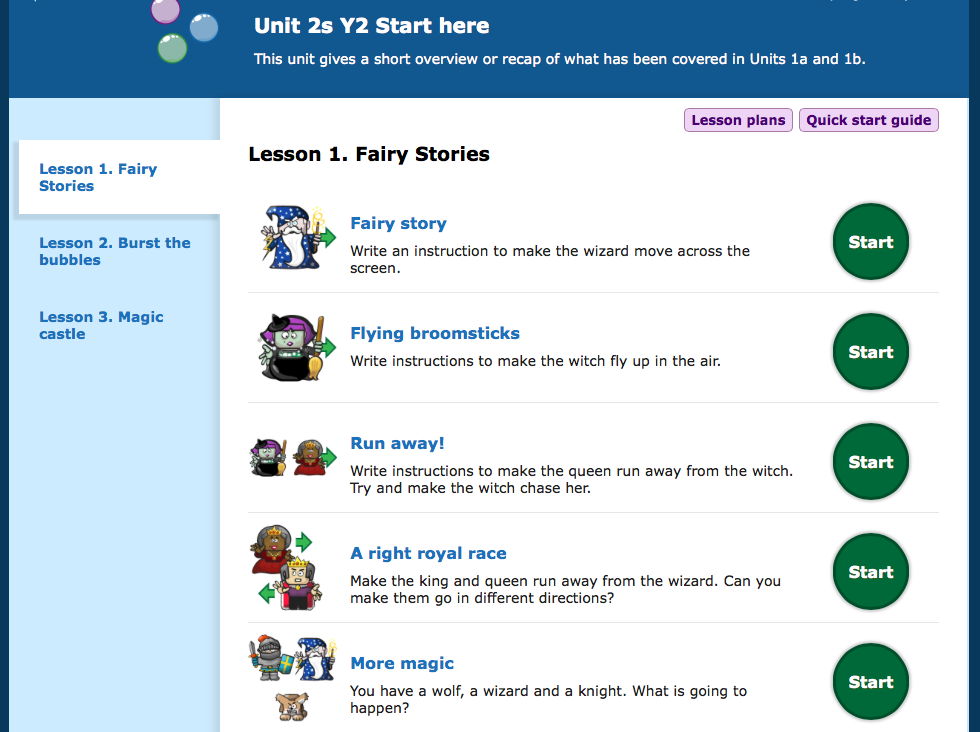
The Espresso Coding resource is split into year groups with a starter, and 2 units for each (apart from year 1). 


Overview showing skills progression

The year 2 starter unit, for example, is split into 3 sections, which review and recap the objectives taught in year 1.  The quick start guide offers an overview with the learning objective that is covered and a rough idea about the timing for the whole unit. 


Once you have finished the starter units, there are a further 2 units with up to 7 sessions in each.  With one session a week this resource will support over a term's worth of teaching. It really will support as well, because lesson plans and tutorials are provided. 


When I introduced this to my year 2 class, I first let them explore the year 1 units. This is because they haven't seen them before and I want them to feel confident navigating around the resource. They have since been totally engrossed each time we have used this. What I really like is that at the end of each unit children get the opportunity to build their own app, using the skills they have learned in each unit.  So, for year 2s, they get to decide what will happen to objects when they are clicked. The session at the end of unit 2b concentrates on debugging exercises, helping to cover the program of study at ks1 perfectly!


Choosing your characters and background 


With my year twos I have offered very little teaching input as I have been curious to see what they do independently. Certain children have needed support in the form of encouragement, though the majority have been able to navigate around the activities and solve them independently. I find that mixed ability pairing works well in these situations, though I have to monitor carefully that each child in the pair is working and understanding what they are doing.  For trickier sessions and assessment, I split the class in half so that I can concentrate on more children. 

Espresso Coding supports teachers to deliver the coding part of the curriculum and sits very well with other resources, like Kodu and scratch, because it makes sure that all skills are covered (the overview photograph above shows how the progression of skills are covered). It supports teachers because it is more structured and because the tutorials and lesson plans are helpful. 


Tutorial videos
In my opinion, Espresso Coding sits very nicely with the other apps and resources that we have in school. If you do invest in it, invest in staff meeting time too. I would recommend a session for teachers to play themselves, then a follow up session the next half term where teachers are expected to feed back their own and pupil's views. If you're paying for it, you need to ensure it is used!


Lesson plan

Sunday, November 9, 2014

Little Fox Music Box

I love this app for EYFS and ks1 because it introduces children to composing their own music. It covers part of the new computing curriculum: use technology purposefully to create, store, manipulate and retrieve digital content.

Let's start with singing. There are three songs that you can listen to, sing along in a karaoke style or record your own. The background scene is interactive and humorous. It allows little fingers to explore and control. Delightful! 


The lullaby has quite tricky words, but the version of Old Macdonald is gorgeous. It allows you to change the seasons, stack chicks and give the pig a shower amongst other things.


Changing the seasons allows you to grow different plants. Did I mention this app is delightful?!


But by far the most useful part of this app is the fox composing studio. 


Once inside there is an array of different objects that make different sounds. Click the pink dukebox for your beat (choice of three-the fox dances accordingly) and you are away. It is very amusing! 


If you scroll left and right there are more sounds available.


You can sing along and of course all of this is recordable. I have had this on my iPad for a while, but hadn't got around to playing it. When I finally did last half term, I realised the potential for our children. In my opinion It's an EYFS/infant version of GarageBand or Rockmate. We have purchased it for our iPads at school - it's a quality resource for learning.


Saturday, November 8, 2014

Light bot


Another computing post that has been a long time coming. Light bot is a great little program, available as an iPad/android app or on the web, that teaches early coding skills. Children can progress through levels, using symbols as the programming language. 


The aim is to light up all the blue squares. New symbols and challenges are quickly introduced.


The next challenge is to light more than one square, using up to 12 commands.


After this, you learn to write procedures that can be repeated.


The next step is to use loops. 


There are two iPad apps available, for ages 4-8 and 9-12, at £1.99 each. The latter introduces variables and although it doesn't allow children to explore programming creativity, it does get them to use logical thinking skills. A nice little app.