Showing posts with label Coding. Show all posts

Monday, December 29, 2014

Espresso Coding

We made the most of the Espresso coding resource whilst it was free for schools, then purchased it to complement existing resources and to support teachers to deliver certain aspects of the computing curriculum. We are very fortunate to have the Rising Stars Switched on ICT scheme, which supports teachers to use ICT creatively, but this makes sure that the coding aspects are covered, such as the first few bullet points of the computing curriculum at KS2:

Pupils should be taught to:
  • design, write and debug programs that accomplish specific goals, including controlling or simulating physical systems; solve problems by decomposing them into smaller parts
  • use sequence, selection, and repetition in programs; work with variables and various forms of input and output
  • use logical reasoning to explain how some simple algorithms work and to detect and correct errors in algorithms and programs

The Espresso Coding resource is split into year groups with a starter, and 2 units for each (apart from year 1). 


Overview showing skills progression

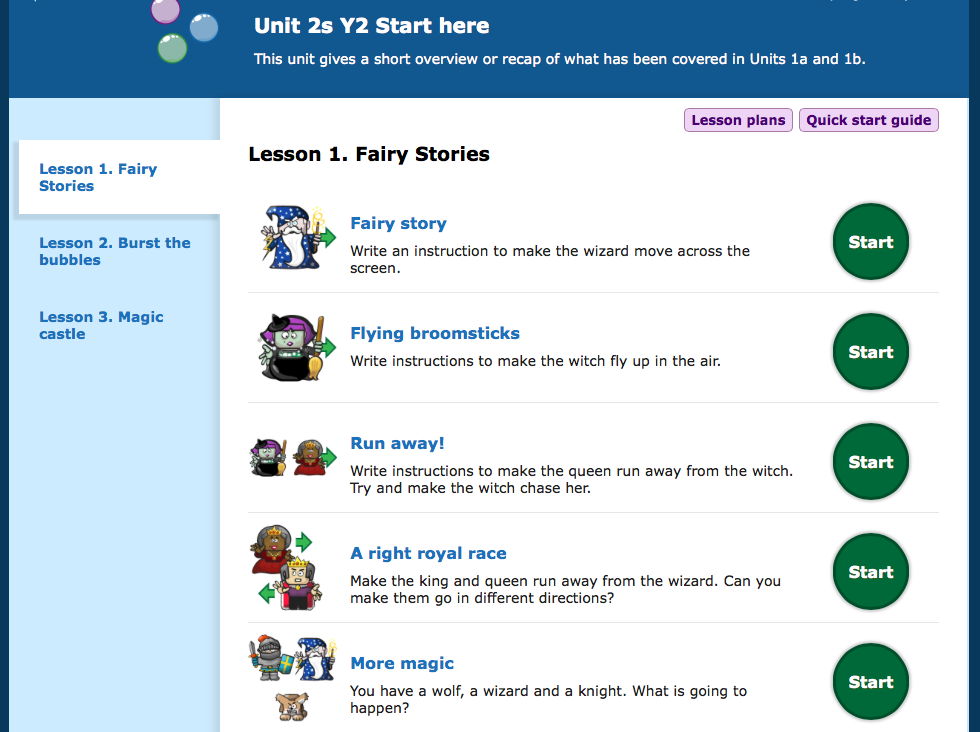
The year 2 starter unit, for example, is split into 3 sections, which review and recap the objectives taught in year 1.  The quick start guide offers an overview with the learning objective that is covered and a rough idea about the timing for the whole unit. 


Once you have finished the starter units, there are a further 2 units with up to 7 sessions in each.  With one session a week this resource will support over a term's worth of teaching. It really will support as well, because lesson plans and tutorials are provided. 


When I introduced this to my year 2 class, I first let them explore the year 1 units. This is because they haven't seen them before and I want them to feel confident navigating around the resource. They have since been totally engrossed each time we have used this. What I really like is that at the end of each unit children get the opportunity to build their own app, using the skills they have learned in each unit.  So, for year 2s, they get to decide what will happen to objects when they are clicked. The session at the end of unit 2b concentrates on debugging exercises, helping to cover the program of study at ks1 perfectly!


Choosing your characters and background 


With my year twos I have offered very little teaching input as I have been curious to see what they do independently. Certain children have needed support in the form of encouragement, though the majority have been able to navigate around the activities and solve them independently. I find that mixed ability pairing works well in these situations, though I have to monitor carefully that each child in the pair is working and understanding what they are doing.  For trickier sessions and assessment, I split the class in half so that I can concentrate on more children. 

Espresso Coding supports teachers to deliver the coding part of the curriculum and sits very well with other resources, like Kodu and scratch, because it makes sure that all skills are covered (the overview photograph above shows how the progression of skills are covered). It supports teachers because it is more structured and because the tutorials and lesson plans are helpful. 


Tutorial videos
In my opinion, Espresso Coding sits very nicely with the other apps and resources that we have in school. If you do invest in it, invest in staff meeting time too. I would recommend a session for teachers to play themselves, then a follow up session the next half term where teachers are expected to feed back their own and pupil's views. If you're paying for it, you need to ensure it is used!


Lesson plan

Thursday, March 28, 2013

Hakitzu - JavaScript coding on an ipad!

I am going to start this post with an admission. I'm not really a gamer and my coding skills are poor. Yes I can keep up with KS2 children; I have learned how to use basic HTML code for blogging, can use Hackasaurus and Thimble and love gaming Kodu and Scratch, but that's about my limit.

We have children at Roydon who love minecraft. We use it as an incentive and as a reward for good behaviour with certain children. When I first heard about Kuato Hakitzu, via twitter of course and Kuato's chief education architect David Miller, I thought it would present great challenges for our digital leaders, but also for a talented child in my class who has behaviour that challenges (some people) and an obsession with gaming derived from being allowed to access 18+ games at the age of about 3. Incidently, this child also enjoys playing 'Teach your monster to read'. Very twee in comparison. He also loves A.L.E.X on the ipads - a game similar in nature to beebot, which I have blogged about elsewhere. I hope that Hakitzu will help channel some of his talents with a more appropriate platform, whilst helping him develop coding skills. 

So as with everything, I have had a play before introducing it at school. Unfortunately most of my digital leaders are girls and I'm not sure how much it will appeal to them, but hopefully they will learn to use it so that they can teach others. I think it is great and I know how children can be influenced by a teacher's enthusiasm!

So, my first experience with this game. I started by kitting out 2 of my robots. At this point I realised that I was more worried about the colour and aesthetic qualities rather than anything else. It's a female thing. I've always been Tom-boyish, but maybe not when it comes to shiny things. They have to look good! So my robots probably aren't the best designs for battle. I'm sure that children will spend more time experimenting than I have. After kitting out your robots, you then choose where you want to battle. There are three arenas: Hardplace rock, Rumble rig and Destropolis.


Once there, you are given tips on how to code, then off you go! You cannot make an error as it highlights it in red if you do. You only have 120 action points to start, so you have to be wise about your moves. I wasn't, then realised I had totally overspent when it came to executing the moves. I had to reduce one of the codes that had taken me ages to write! (A youngster would have probably done it in seconds!) You can also only do 9 'moves' in one go, so you might not be able to reach your desired goal in one execution. This makes it feel a bit like a game of chess. I am trying to imagine what my opponent will do, so that I can defend whilst attacking. Great for promoting strategic thinking in our children!


Even more embarrassingly than not paying attention to my credits, I managed to 'move' one of my robots to exactly the same position! He is now a sentry in the wrong place (see picture!) Gah! I have always been rubbish with my left and right, but I thought I had been careful with this. Clearly not!


My robot did some nifty footwork, but stayed in the same place!
I am blogging quickly whilst awaiting my opponent's move. I fear I will not live long...we shall see. I am loving this already, even though I am sure that I will never be an expert at it. It has huge potential for our proposed computing curriculum and to bring a bit of that awe, wonder and excitement to education. A great companion (next step) for my other favourite- Kodu and perfect because it allows our children to develop coding skills on the ipads. It is always great when we can show  I would love to know your thoughts too!


Three arenas for your battles

For further reading, take a look at the press release or maybe you would prefer to browse their youtube channel. David has also pointed me in the direction of a facebook page which may interest you.