Showing posts with label Shropshire computing conference. Show all posts

Monday, March 9, 2015

Quality free computing resources part 1: Code club and hour of code


This year I started running Code Club for year 5 children. We have access to PCs and ipads and will use both, as well as some hardware to use in the future.


My 'code clubbers' are also going to blog about their journey as a kind of online journal. That's what blogging is all about! They have been an enthusiastic bunch who have dived right in to what ever I have shown them. So here's how I've run it so far: I share a link, I give a clue (sometimes) and I leave them to it! It's all about their computational thinking and I'm not going to spoil that process by spoon feeding too much.

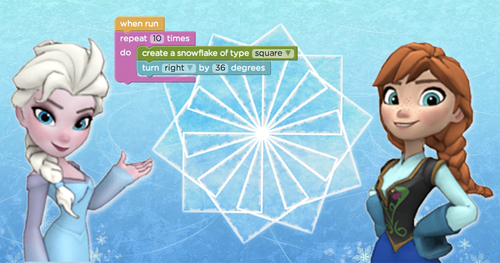
I had signed up to hour of code a while ago so that I was familiar with the resources and had used the Frozen hour of code with my year 2 class. It went down very well. I used the same with the year 5s, knowing that they would go beyond the highest level that my year 2s got to (12). The children are very motivated by the certificates at the end. We have since used Flappy Birds, Tynker and Scratch on both the iPad and PC. 


The thing about the Hour of Code is that it's all there ready for you to use. There are tutorials and each puzzle comes with hints and/or clues. It really has been well thought out as it scaffolds children's learning beautifully. My year 5 code clubbers will be able to help others in class when needed, though I think most will be able to manage without their support.

Tynker was very popular because you were able to build your own characters before starting each puzzle and Frozen, because who hasn't seen the film?! Within Tynker there are a range of different games to try and some are easy enough for my year 2 class. So, enough of reading my post - get onto code.org and get playing yourself!

Shropshire Computing Conference March 2014


Hello all! Please share your thoughts, ideas and questions on a sticky. 

Yellow notes are links to share. Write thoughts and ideas on green and questions on blue please.

Shropshire Computing Conference presentation

Here is my presentation. Hopefully you will be able to find everything that I have referred to here by clicking on the Shropshire Computing Conference tag at the bottom of the post.

Free literature / resources to help you deliver the computing curriculum

This post is another information post for the Shropshire Computing Conference, in case I don't have time to say everything I want to. I'm saying thanks to all the folk mentioned at the start of this post, in case they don't scroll down to the end! Your hard work saves us time and energy - and for that I would imagine there are many grateful people as grateful as I am. So, some freebies ...


Miles Berry is a king in the computing world. If you don't believe me, check out his blog where you will see that he helped write the curriculum for primary. He has also written the CAS Primary Computing in the National Curriculum: A guide for teachers

What Miles does well is remind us that the new computing curriculum is not so different from the old ICT curriculum. Don't forget all the lovely creative things you have been doing with open ended projects and collaborative work, using all sorts of resources.

********************

The BSC, a key partner to CAS (computing at School) has created a computational thinking framework and a computing progression pathways chart.


The former is structured in the following helpful areas:

Stage 1: Definition 
Stage 2: Concepts 
Stage 3: Classroom techniques 
Stage 4: Assessment

With the progression pathway featuring in the assessment stage.


********************


Barefoot computing is part of CAS, aimed at primary aged children. It has some brilliant free resources to help you plan, learn yourself and teach computer science. Take a look at this fossil animation algorithm that they have created.


********************


Rising stars have been good friends to me in my previous role as an AST and in producing my Getting Started with Digital Leader leaflets. They provide a huge amount of free resources to support teachers and are currently offering free computing webinars. Rising Stars have also published a free CPD toolkit - Quickstart Computing. Last year, every school received sample units for KS1 and KS2 Switched on Computing, written by the aforementioned Miles Berry. Finally, they also provided a free computing with Microsoft taster pack (see image) with 6 units that cover the new curriculum program of study.


********************


Last, but in no way least, Simon Haughton produces a huge amount of free resources for ICT and computing, for which we are very grateful. His booklet, Computing Theory for 7-11 year olds, will come in very handy for many educators. 


Sunday, March 8, 2015

Computing resources part 1: Raspberri pi, Kodu and Makey Makey

Raspberry Pi

I'm not going to pretend to be a Raspberry Pi expert, but I am a fan of it, what others have done with it and its potential. The brilliant Raspberry Pi website tells you everything you need to know and the introductory film is fab. My #DLchat buddy @clcsimon has created resources for this site (the sorting hat) and I know that @MissPhilbin and @eslweb are Pi experts. It's worth checking out their blogs because although they are secondary, some of the resources will transfer to upper KS2, especially with your computing whizzes.


I bought my Pi at a Raspberry Pi teachmeet in Cambridge in 2012, but aside from getting it started and playing around with Scratch on it, I haven't really used it ... We had just purchased our iPads in school and the digital leader energy was focused on that. I'm sure we have some at East Harling, but I am not responsible for the digital leaders there, so I am not sure if they have used them. I shall show mine to my Code Club this year to see what they make of it. Even if we just use it for Scratch, it will be an achievement for them - and an introduction before they go off to high school, where I know @kevin_sait is doing marvellous things with tech.  


For more information or ideas for using your Pi in primary, try Sway Grantham's blog. You can see her digital leaders in action here.


Kodu


I've blogged about Kodu before, because I think it is one of the best free resources available for KS2 up (though they promote it from age 5 up). The way that you toggle between creating and play is excellent and the potential for creativity enormous. The folk who say that the computing curriculum is dull or doesn't have potential for innovation/imagination (yes, I've read lots of tweets along those lines) are not looking in the right places or are interpreting the curriculum in the right way (in my opinion). With kodu you can take any theme you want and create your world to go with it - I made my own Game of Thrones World! Tutorials are provided and I know that someone with more time than I have could take this to a multi-layered game. The free classroom kit contains lesson plans and activities for teachers to use.  I highly recommend this resource! 


These film clips are what some year 6 children created during their first 'play' with it in 2011. You can see the original post here.


Makey makey


One of my Roydon DLs with Mathieu and his Makey Makey


My digital leaders at Roydon experienced Makey Makey when we went down to London for the Nightzookeeper kidsmeet. Using the kit and some clips you can turn everyday objects into computer touchpads. Genius! You can read about the creators on their blog and find out more about the potential and creativity you can encourage through the Makey Makey. More resources and ideas can be found here.


If you have any more links, please add them via a comment - I'm sure the folk at the Shropshire conference will be grateful!

Wednesday, March 4, 2015

Why should we employ digital leaders in school?

I asked the question below ready for the keynote I am delivering at the Shropshire computing conference next week and got lots of helpful responses. Then someone asked if I would storify it to help others. Erm ... yes! It's always good to learn something new! I've seen them and been mentioned in them before, so tried it straight away. It's simple to use and a great way of collecting tweets. I'm sure this won't be the last time I use it!


Sunday, February 22, 2015

Two iPad apps for early computing

These two apps were freebies that I installed via apps gone free. The first is called RGB express and much to my surprise I was quite impressed with it! The aim is to get your truck to the garage, sometimes picking up cargo on the way. You plan your route, then finger swipe the way you want your truck to go. Press play and you're off! 


 I can see how this would fit in nicely in the early years and was impressed when it became clear that the further you progressed through the app, the more thinking is required! 


When you get to certain levels (and you reach them quite quickly) you have to think through the routes for both your trucks as they can't cross over. Perfect! Logical reasoning, unambiguous instructions, creating and debugging are covered in an EYFS style! 


The second app looks very familiar, in a Beebot kind of way. Code blast differs in that it makes writing algorithm slightly easier, in that turns and moves are not separate commands. For that reason I wouldn't give it to a child who has mastered Beebot, as this would confuse them (it initially confused me!) It's a nice introduction to writing algorithms and the commands are visible on the right hand side of the app. When you press play it highlights in green where it us, which helps debugging when it goes pear shaped! As you can see, the algorithms can be quite lengthy.


When I completed 12 levels I earned a certificate, which I knows important to many children.


I'm now on the silver level and am now able to shoot aliens that are in the way. This will keep some children interested, if they have kept their interest up to level 12.


I am intrigued as to what will happen in gold level and am hopeful that it may progress onto the repeat command, but presently I don't have enough time to investigate. I shall find a willing beta tester next week at school! I will add their opinions asap.


Don't forget you can find some more computing apps on my ipad site

Sunday, February 8, 2015

What is an algorithm?


Trying to teach your children what an algorithm is, but not sure how? Well there's plenty of support out there that will help you become more confident when teaching your class to understand what it means - and how to write them.

The BBC describe algorithms as a list of rules to follow in order to solve a problem. They have kindly created a page called Code Needs Algorithms, which is part of their What is an Algorithm? Bitesize pages. You are reminded about the times that you have already used algorithms, such as map directions and instructions for how to make things. There is a handy video that you can play to your class before starting work. With the pages on digital literacy, it's a nice gentle way to get you started on the computing curriculum.


When the light bulb pings and you realise that you have used algorithms many times before, without naming them, you realise that there are many ways you can extend learning through other curriculum subjects. Barefoot Computing have put together a lovely little KS1 activity called Crazy Character Algorithms that, even if you don't use it yourself, will surely spark some ideas of your own.

Stuart Hadfield, a member of CAS, has put together a page of ideas for introducing algorithms to children in reception class. If you look back at my previous posts you will find some great resources that enable children to write and use algorithms.


Writing algorithms in key stage 1 and 2 with Scratch


Scratch has been around for a while now and in my opinion is a great tool for early computing, not just because it is free, but because  it allows children to use their creativity and create a wide range of projects independently. It can be used as early as year 1 and many infant teachers have used it successfully. I have used it with my more able children in KS1 and infant digital leaders.  For KS2 children it satisfies the very first bullet points of the new curriculum:

  • design, write and debug programs that accomplish specific goals, including controlling or simulating physical systems; solve problems by decomposing them into smaller parts
  • use sequence, selection, and repetition in programs; work with variables and various forms of input and output 
  •  use logical reasoning to explain how some simple algorithms work and to detect and correct errors in algorithms and programs


Having Scratch on an ipad is a bonus too, as it is a great introduction to the more in-depth projects that can be achieved on a PC. The basic app is free, but you can buy Scratch games too, which provides video tutorials for creating your own games.


There are many scratch experts out there and I have never felt the need to create my own resources because of this. Before I found them, I used the cards and projects from the Scratch site to show children the basics and what could be achieved, then I let them explore. When they learned new skills they taught one another, consolidating their own learning in the process. Simples! Don't be afraid to let them take the lead. If they own their learning, they are much more likely to extend it. I know the basics and am able to help to a certain point if weaker children got stuck, but if I didn't know an answer I modelled great problem solving skills, trial and error and perseverance. Still great teaching in my opinion! Children have loved creating simple games, from the very basic car track to angry birds games. Thanks to Phil Bagge (@Baggiepr) who has created a sequence of Scratch programs that can be used for year 2 up. Simon Haughton has also created Scratch resources and has a website  devoted to all things ICT/computing.


Part 2 coming soon!


Monday, December 29, 2014

Espresso Coding

We made the most of the Espresso coding resource whilst it was free for schools, then purchased it to complement existing resources and to support teachers to deliver certain aspects of the computing curriculum. We are very fortunate to have the Rising Stars Switched on ICT scheme, which supports teachers to use ICT creatively, but this makes sure that the coding aspects are covered, such as the first few bullet points of the computing curriculum at KS2:

Pupils should be taught to:
  • design, write and debug programs that accomplish specific goals, including controlling or simulating physical systems; solve problems by decomposing them into smaller parts
  • use sequence, selection, and repetition in programs; work with variables and various forms of input and output
  • use logical reasoning to explain how some simple algorithms work and to detect and correct errors in algorithms and programs

The Espresso Coding resource is split into year groups with a starter, and 2 units for each (apart from year 1). 


Overview showing skills progression

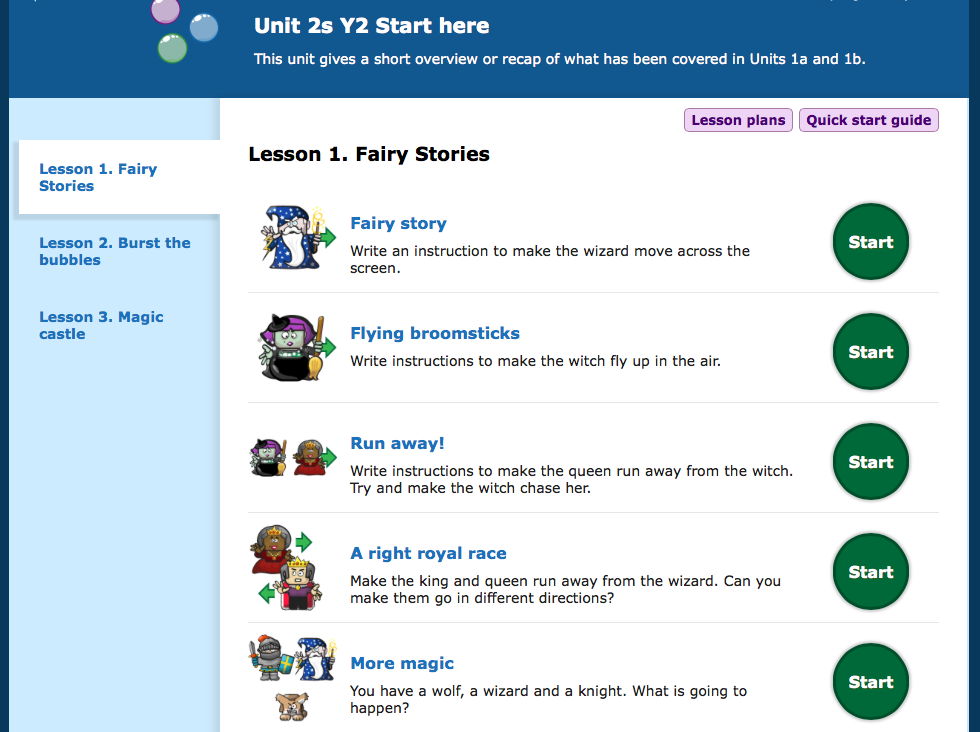
The year 2 starter unit, for example, is split into 3 sections, which review and recap the objectives taught in year 1.  The quick start guide offers an overview with the learning objective that is covered and a rough idea about the timing for the whole unit. 


Once you have finished the starter units, there are a further 2 units with up to 7 sessions in each.  With one session a week this resource will support over a term's worth of teaching. It really will support as well, because lesson plans and tutorials are provided. 


When I introduced this to my year 2 class, I first let them explore the year 1 units. This is because they haven't seen them before and I want them to feel confident navigating around the resource. They have since been totally engrossed each time we have used this. What I really like is that at the end of each unit children get the opportunity to build their own app, using the skills they have learned in each unit.  So, for year 2s, they get to decide what will happen to objects when they are clicked. The session at the end of unit 2b concentrates on debugging exercises, helping to cover the program of study at ks1 perfectly!


Choosing your characters and background 


With my year twos I have offered very little teaching input as I have been curious to see what they do independently. Certain children have needed support in the form of encouragement, though the majority have been able to navigate around the activities and solve them independently. I find that mixed ability pairing works well in these situations, though I have to monitor carefully that each child in the pair is working and understanding what they are doing.  For trickier sessions and assessment, I split the class in half so that I can concentrate on more children. 

Espresso Coding supports teachers to deliver the coding part of the curriculum and sits very well with other resources, like Kodu and scratch, because it makes sure that all skills are covered (the overview photograph above shows how the progression of skills are covered). It supports teachers because it is more structured and because the tutorials and lesson plans are helpful. 


Tutorial videos
In my opinion, Espresso Coding sits very nicely with the other apps and resources that we have in school. If you do invest in it, invest in staff meeting time too. I would recommend a session for teachers to play themselves, then a follow up session the next half term where teachers are expected to feed back their own and pupil's views. If you're paying for it, you need to ensure it is used!


Lesson plan

Sunday, December 7, 2014

Run Marco!


This is a nice little app that will help our young learners apply their computing skills. It is available for both ipad and android. At KS1 children will learn:
  • that programs execute by following precise and unambiguous instructions
  • to create and debug simple programs
  • use logical reasoning to predict the behaviour of simple programs
and KS2:

  • design, write and debug programs that accomplish specific goals, including controllingor simulating physical systems; solve problems by decomposing them into smaller parts
  • use sequence, selection, and repetition in programs; work with variables and variousforms of input and output
  • use logical reasoning to explain how some simple algorithms work and to detect and correct errors in algorithms and programs
(Computing programs of study 2014)
There are 10 levels, with 10 more coming soon. 


It starts off with simple steps that are modelled for you, so you can't go wrong. 
It quickly moves on to the repeat command, so that our children can make links between this and the previous steps - and the reason for having a repeat command.
The next step is learning about variables in a very simple way. This again is modelled clearly for you. 

It encourages children to think about shortening their sequences and creating loops, thus making their algorithms more efficient. A great little app that is free too!


Saturday, November 29, 2014

Fix the factory

Another super little app for early programming. Like ALEX this will appeal to my year 2 children because it involves robots. There are some great things about this free app too. Firstly, you have to complete the first levels before you can unlock and access the harder ones. There are 24 levels altogether- pretty good for a freebie!


The game starts off simply, the same as ALEX, but becomes more challenging very quickly. By level 3 you are learning to grab and drop, then by level 4 your computational thinking is being challenged (well mine was!) with turns, grabs and drops.


The thing I really like about this app is how it scaffolds your learning. When I went wrong on level 4 ( yes, that early on!) it let me know exactly where I went wrong by putting a cross (or kiss as I like to think of it!) onto the command that was incorrect. The commands in your procedure light up as the robot performs them, so you can see exactly where you are. Perfect! I know that the point of computing is that you learn to debug, but for year two children it's nice that they are given a hint. 
The notion of 'if at first you don't succeed...' is great, but I don't want children to switch off - and this has happened with the Beebot app. The fact that they don't have to rewrite the whole procedure is also good. I'm not ashamed to show how many attempts on made at level 6 (it's11pm- that's my excuse!)

The fact that I didn't have to rewrite the whole procedure each time meant that I didn't give up. I'm still debugging my code in the same way I would if I was using a written programming language.


 So, well done Lego-it's a brilliant app and I will definitely be using this in school. I might have to finish all the levels first though. Only 18 more to go...


Two apps for EYFS/early computing

 I have been playing with a couple of new apps this week that, in my view, lend themselves nicely to early computing.  In old money they fit in well with modelling and simulations, in the new curriculum children will be using logical reasoning to predict the behaviour of simple programs.

The first one I have looked at is Toca Robot lab - it's another lovely app to add to the Toca family. First you select different parts and build your robot.


Then you take your robot on a test flight. There are lots of things to move and crash into and three stars to collect on the way, before you hit the big magnet. This takes you out of the area you have been whizzing round and gives you the opportunity to change your robot. You get a lab test report at the end showing how many stars you collected.  


I would love to see this app being developed a bit further so that maybe they use on screen controls to move their robots, or maybe some areas that they have to learn to avoid etc, to provide a bit more challenge for our able children. A nice little app tho - I'll try and get an opinion from a wee one about it!


The second app is a great little builder app called Build and Play 3D, by Croco studio. There are 15 classic toys for children to build and you can't go wrong assembling them because the model rotates and the parts snap into place. 

Once you have built your toy, you take it out and test it!

Using simple controls on the screen you can simulate a real life situation (in terms of EYFS of course!) I think it's a great little app!


Saturday, November 8, 2014

Light bot


Another computing post that has been a long time coming. Light bot is a great little program, available as an iPad/android app or on the web, that teaches early coding skills. Children can progress through levels, using symbols as the programming language. 


The aim is to light up all the blue squares. New symbols and challenges are quickly introduced.


The next challenge is to light more than one square, using up to 12 commands.


After this, you learn to write procedures that can be repeated.


The next step is to use loops. 


There are two iPad apps available, for ages 4-8 and 9-12, at £1.99 each. The latter introduces variables and although it doesn't allow children to explore programming creativity, it does get them to use logical thinking skills. A nice little app.