Last week I visited a school that I has worked with before, to support new staff with teaching through the mantle of the expert approach. It was a great day, not just because of the drama activities, but because of the great educational debate that followed the two sessions that I delivered.
I had been asked to work with year fives in the morning and year ones in the afternoon. These are both ages groups that I have a lot of experience teaching, predominantly through a dramatic enquiry approach. the challenge was to deliver something that could be started and ended quite quickly. Instead of using something I had done before, I decided that I wanted to use Shaun Tan's book 'The Arrival' as my hook. So here follows a description of the first lesson.
The children sat in a circle in the hall and I began a story of a boy who was sitting in a busy building, in a city, watching a suitcase. I placed an old brown leather suitcase in the middle of the circle of children and continued to describe how he could see that the suitcase had been left unattended and was intrigued as to what might be inside, so making sure no-one else was watching the case, he picked it up and casually left the building. He walked to a nearby park and sat on a bench. The case was locked and he had his second dilemma. Should he force the lock and break into the suitcase? His conscience had split and the good morals his mother had given him were saying don't open the case, but the inquisitive side was saying 'do it'.
 At this point I asked the children, 'What if you were his conscience-what would you be saying?' They took it in turns, contributed ideas and made some pertinent observations. A brilliant conscience alley followed, with quite an even split between opinions. Incidentally, with younger children the majority have wanted to open a bag/case before hearing reasons against it. Their curiosity far exceeds any caution. That said, there was still a slight majority who wanted to open the case with this year five group. The way that I had planned this mantle, it wouldn't have mattered either way.
After they had decided I then asked about the thoughts and feelings of the person who had lost the case, so we did a very brief thought tracking. I then invited the children to return to class.
As soon as they were in I said 'Thank you detectives for joining me in the incident room, we have a new mystery to solve'. I hadn't had a lot of time to prepare for this session, so took a few short cuts. The contents of the case had to imply that the owner had a family and was poor. The actual contents of the case were Florence Nightingale props from a previous mantle, so we couldn't physically open the case. If I had time I would have hunted around charity shops for appropriate props, but what I did turned out to be just as effective. I had written 'Incident Board' on the white board and proceeded to stick up exhibit a, b, c etc which were laminated pictures of the contents of the case.

This included a tie, braces, a shirt, a man's hat, grooming kit, bar of soap, pyjamas, socks, pants, vest picture of wife and child and a letter. All the pictures of clothing were 1940s style. I talked about how the case had been found in the park, with the lock broken and these were the contents that were left inside. I then asked the detectives to consider the facts, then write their thoughts ready for a meeting in 15 minutes. This was an inference and deduction session and when asked afterwards they were clear about this, even though I had given no learning objective.
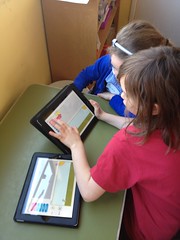
 The children had a 'Missing Person' sheet to write thoughts on and an iPad for each table. The discussions, reasoning and ideas grew throughout the session. Fortunately there were other adults in the room that had come to watch the session and they helped push the children along to start with. As they had not worked in this way before (the teacher explained how he scaffolds by modelling skills) they needed a little push to start talking to one another and to consider the facts and what they might mean. Once they warmed up they quickly decided that google translate would help them decipher the letter and they talked through what the objects in the case implied. On a couple of the tables the children had became confused about the lack of trousers in the case. This was good and the discussions they were having were amazing. I had deliberately left them out as in my story he is poor and is wearing his only pair. I wondered what the children would make of it. They considerd many ideas, though came up with two final ones-that it was an overnight cases or that indeed, the owner was very poor. Before the letter was translated some considered it was from the wife and had been written in a hurry, or whilst she was dying of a war wound. Remember, they had no other visual images other than the contents of the case. They were listening to and building on other children's ideas.

After 15 minutes we had a meeting where the detectives shared their ideas. Some had successfully translated the letter and some great inferences and deductions had been made, based on wars, death of family, need for work and other themes. thought their reasoning was amazing from the few facts that they had been given.
I then told the detectives we were jumping forward in time to two days later. I started to create a timeline on the board, made up from various pictures from Tan's book. I told the group how they had been back to the park and spoken to many people nearby, especially at the immigrations building and the docks. The pictures showed a narrative that could be interpreted in different ways, and here is how the session ended. If it had carried on, a piece of writing could have followed depending on what the teacher wanted to achieve. For example, it could have been a letter back to the child describing the journey, or a diary entry, or the stories of other people in the pictures. I would have created a tableaux of the people on the boat, probably have done some sound-scaping and maybe some emotion tracking. This book lends itself to many possibilities.
After the session we had a very fruitful discussion about this way of teaching, Gove's curriculum and the expectations of OfSTED. I cannot recount all the details here, but I thoroughly enjoyed the challenging questions and the professional debate that ensued.
The afternoon session with the year ones was a potted version of the Fairytale Travel Company, which you can read here. The great thing abut this session was that one of the teachers said it proved to him how you didn't need to model all skills, that he was amazed at how I had given the children the tools and the expectations - and they achieved them, easily. He compared how he would have taught it with what he had witnessed and was 'blown away' by how his ideas were being challenged. I know that I saw someone moving from a fixed to a growth mindset. In fact all of the teachers that I worked with were open to change and desperate to provide the best education for children. When they told me about their working hours and the time and effort that they put in, it made me feel immediately cheesed off about the slating that teachers get, especially Norfolk teachers at the moment. In this one school I had just worked with four dedicated and passionate teachers and it feels great that what I did with them had a positive impact.
I had been asked to work with year fives in the morning and year ones in the afternoon. These are both ages groups that I have a lot of experience teaching, predominantly through a dramatic enquiry approach. the challenge was to deliver something that could be started and ended quite quickly. Instead of using something I had done before, I decided that I wanted to use Shaun Tan's book 'The Arrival' as my hook. So here follows a description of the first lesson.
The children sat in a circle in the hall and I began a story of a boy who was sitting in a busy building, in a city, watching a suitcase. I placed an old brown leather suitcase in the middle of the circle of children and continued to describe how he could see that the suitcase had been left unattended and was intrigued as to what might be inside, so making sure no-one else was watching the case, he picked it up and casually left the building. He walked to a nearby park and sat on a bench. The case was locked and he had his second dilemma. Should he force the lock and break into the suitcase? His conscience had split and the good morals his mother had given him were saying don't open the case, but the inquisitive side was saying 'do it'.
After they had decided I then asked about the thoughts and feelings of the person who had lost the case, so we did a very brief thought tracking. I then invited the children to return to class.
As soon as they were in I said 'Thank you detectives for joining me in the incident room, we have a new mystery to solve'. I hadn't had a lot of time to prepare for this session, so took a few short cuts. The contents of the case had to imply that the owner had a family and was poor. The actual contents of the case were Florence Nightingale props from a previous mantle, so we couldn't physically open the case. If I had time I would have hunted around charity shops for appropriate props, but what I did turned out to be just as effective. I had written 'Incident Board' on the white board and proceeded to stick up exhibit a, b, c etc which were laminated pictures of the contents of the case.
This included a tie, braces, a shirt, a man's hat, grooming kit, bar of soap, pyjamas, socks, pants, vest picture of wife and child and a letter. All the pictures of clothing were 1940s style. I talked about how the case had been found in the park, with the lock broken and these were the contents that were left inside. I then asked the detectives to consider the facts, then write their thoughts ready for a meeting in 15 minutes. This was an inference and deduction session and when asked afterwards they were clear about this, even though I had given no learning objective.
After 15 minutes we had a meeting where the detectives shared their ideas. Some had successfully translated the letter and some great inferences and deductions had been made, based on wars, death of family, need for work and other themes. thought their reasoning was amazing from the few facts that they had been given.
I then told the detectives we were jumping forward in time to two days later. I started to create a timeline on the board, made up from various pictures from Tan's book. I told the group how they had been back to the park and spoken to many people nearby, especially at the immigrations building and the docks. The pictures showed a narrative that could be interpreted in different ways, and here is how the session ended. If it had carried on, a piece of writing could have followed depending on what the teacher wanted to achieve. For example, it could have been a letter back to the child describing the journey, or a diary entry, or the stories of other people in the pictures. I would have created a tableaux of the people on the boat, probably have done some sound-scaping and maybe some emotion tracking. This book lends itself to many possibilities.
After the session we had a very fruitful discussion about this way of teaching, Gove's curriculum and the expectations of OfSTED. I cannot recount all the details here, but I thoroughly enjoyed the challenging questions and the professional debate that ensued.
The afternoon session with the year ones was a potted version of the Fairytale Travel Company, which you can read here. The great thing abut this session was that one of the teachers said it proved to him how you didn't need to model all skills, that he was amazed at how I had given the children the tools and the expectations - and they achieved them, easily. He compared how he would have taught it with what he had witnessed and was 'blown away' by how his ideas were being challenged. I know that I saw someone moving from a fixed to a growth mindset. In fact all of the teachers that I worked with were open to change and desperate to provide the best education for children. When they told me about their working hours and the time and effort that they put in, it made me feel immediately cheesed off about the slating that teachers get, especially Norfolk teachers at the moment. In this one school I had just worked with four dedicated and passionate teachers and it feels great that what I did with them had a positive impact.